MasterClass: Become More You
- 4.7
- Rating
- 1.00M
- Installs
- Free
- Price

 Analysis by App-foxy
I approached MasterClass: Become More You as an education app for people who want useful ideas in short, polished sessions rather than a traditional course with homework, tests, and a fixed timetable. It is offered by MasterClass Inc. and sits in the education category, but its appeal is broader than academic study. I found it better suited to guided curiosity: improving a creative habit, understanding a professional skill, or making a personal interest easier to pursue.
The first impression is strong because the app presents learning as something that can fit around ordinary life. The store summary promises new skills in ten minutes, and that spirit is clear in the way the experience encourages short visits. I could imagine opening it before work, during a lunch break, or at the end of the day when I wanted something more purposeful than casual scrolling. The important question, though, is not whether the lessons look attractive. It is whether the design helps different people actually use them. In my experience, the answer is mostly yes, although the format also creates some limits that are easy to overlook.
A polished learning space that rewards short, focused visits
I focus here on the app’s short-session approach: it can make a substantial subject feel approachable when I have only a small window to learn. I also find that the format works best when I decide what I want to take away before pressing play. That simple choice leads naturally to the question of how a brief visit can become practical learning rather than just more viewing.
You May Also Like

 Blood Strike: 2.5 Anniversary
Blood Strike’s Loadouts Turn Every Drop Into a Tactical Gamble
A close look at Blood Strike’s custom loadouts: how fast access to signature weapons reshapes its battle royale rhythm, rewards preparation, and narrows the gap between fights.

 Pandora - Music & Podcasts
Pandora’s Music Is Easy to Start, but Harder to Recover
Pandora’s strength is its low-effort path from a seed to a station. Its weak spot is how much confidence it asks you to place in connection, setup, and quiet recovery.

 8 Ball Pool
 Is Built on Rivalries, Rematches, and Routine
A close look at the rivalries, rematches, shared routines, and unanswered safety questions that turn a quick pool match into a persistent mobile community.

 Samsung Music
’s Quiet Strength Is Playing What You Already Own
Its reach comes less from spectacle than from dependable access to a personal library. That simplicity is both the app’s strongest retention engine and its ceiling.

 AccuWeather: Weather Radar
AccuWeather Review: A Quick, Clear Forecast for Everyday Decisions
For everyday plans, the best forecast is the one you can understand quickly. AccuWeather makes rain timing, radar, and local conditions easy to act on, with a few trade-offs.

 Hill Climb Racing
Why Hill Climb Racing Still Turns Crashes Into One More Run
A tiny car, a bumpy hill and one more upgrade: Hill Climb Racing keeps resurfacing because its simple chaos makes every near-miss feel personal.
More From Our News Desk



Readability and navigation for different learning styles
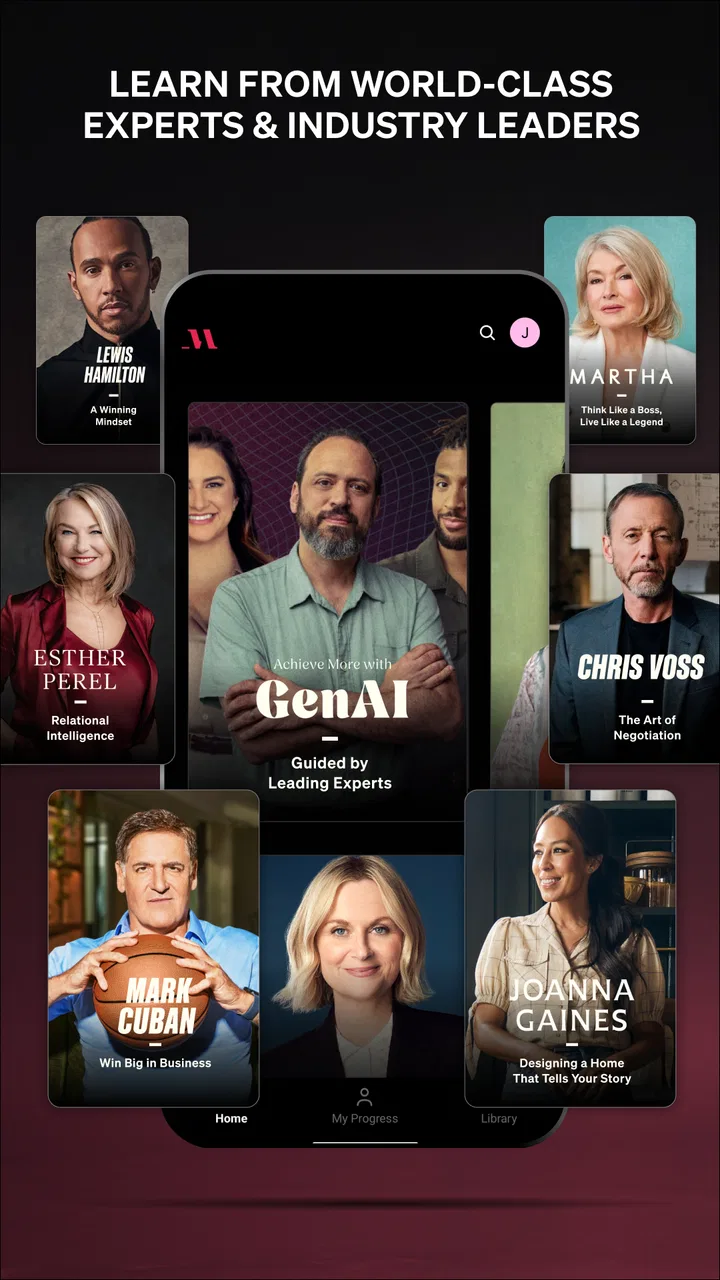
The app’s biggest strength is its sense of direction. Instead of dropping me into a plain catalogue of disconnected lessons, it makes browsing feel like choosing a subject from a carefully arranged library. That matters for users who become overwhelmed by large amounts of educational material. A clear visual hierarchy can make the difference between exploring a topic and abandoning the app before starting anything.
I found the presentation easy to understand when I was deciding what to watch next. Course themes are more inviting than technical menus, and the overall tone feels closer to a high-quality video guide than to a formal learning-management system. For someone who learns best by seeing an expert demonstrate an idea, this is more approachable than a text-heavy course platform. The experience also works well for a user who wants inspiration before committing to a subject.
That simplicity has a trade-off. A visually rich catalogue can encourage browsing without guaranteeing progress. I could spend time selecting an interesting class, watching part of it, and then moving on to another appealing subject. If your goal is a qualification, a complete syllabus, or measurable mastery, you will need to create your own structure. I recommend choosing one practical outcome before opening the app, such as planning a short story, improving a presentation, or preparing a recipe. That small decision turns passive viewing into a more useful session.
The app is free to install, but the learning experience is connected to in-app purchases ranging from $89.99 to $239.99 per item. That is an important distinction for anyone expecting a completely free education tool. I would treat the initial download as a way to inspect the style and decide whether the catalogue suits me, not as a promise that every class is available without payment. The purchase commitment is substantial enough that I would only consider it after identifying several subjects I genuinely expect to use.
MasterClass Inc. has clearly built the product around presentation quality and discoverability rather than the dense controls found in study software. Its average rating is 4.7 from around 25 thousand ratings, and the app has passed one million installs. Those figures suggest a broad audience, but they do not remove the need to test the experience against your own reading comfort, attention span, and learning goals.
How the visual approach helps, and where it may not
For me, the visual style makes the app feel less intimidating than many educational alternatives. A conventional online course may begin with a long list of modules, documents, and assignments. Here, the emphasis is on discovering a teacher or subject through video-led material. That can help a beginner who does not yet know the vocabulary of a field. Seeing an idea demonstrated can also make it easier to understand than reading a definition first.
However, users who prefer dense written explanations may find the balance less comfortable. Video is not automatically more accessible than text. It requires sustained attention, and it can be harder to skim, compare, or search mentally than a well-structured article. If I need to return quickly to one specific principle, a written reference guide is often faster. I would use this app to build context and motivation, then keep notes in a separate place for ideas I expect to revisit.
A useful personal workflow is to watch with a single note-taking question in mind: “What will I try today?” I avoid copying every point. Instead, I record one action and one question. This prevents a short lesson from turning into an endless note-taking task, while still giving the session a practical result. It is especially helpful for people with limited concentration, because the goal stays small and visible.
Motor and sensory considerations during everyday use
The app’s lesson-based format can suit people who prefer to control their own pace. I can pause when I need to process an idea, stop before a distracting section, or return later instead of completing everything in one sitting. That flexibility is useful for users whose energy, attention, or physical comfort changes during the day. A short session can be more realistic than a long classroom-style commitment.
At the same time, video-led learning places demands on sight, hearing, and device interaction. A person with hearing loss may need dependable text support to follow spoken material, while someone with visual fatigue may prefer audio or a larger screen. A user with limited hand movement may also find repeated tapping, scrolling, or precise controls tiring. I would not assume that an attractive interface automatically solves these issues. Before paying, I would test a sample lesson in the exact setting where I expect to learn: with headphones, without headphones, on a phone, or on a larger device.
There is also a sensory question that is easy to miss. Highly produced educational video can include rapid changes in imagery, music, or visual emphasis. For some people that creates energy; for others it becomes distracting. I found the app most comfortable when I treated it as a focused viewing activity rather than background audio. If you are sensitive to sound or movement, a quiet environment and a lower-distraction setup may make the difference between absorbing the lesson and switching away from it.
The content rating is Teen, which gives families a useful general signal about the intended audience. I would still make choices by subject and personal maturity rather than treating that label as a detailed guide to every lesson. For a teenager, the app may be motivating when used alongside a concrete project. For a younger child, I would want an adult to select material and help interpret it, especially because the platform is designed more for independent interest than for elementary instruction.
Situational access: learning when a full course is unrealistic
The strongest use case I found is the fragmented day. Imagine finishing a commute, having ten minutes before an appointment, or waiting while dinner cooks. You may not have enough time for a textbook chapter, but you do have enough time to encounter one technique or perspective. The app fits that situation better than a course that expects uninterrupted study blocks.
I also see value for people returning to a hobby after a long break. Someone who wants to write, cook, perform, lead, or develop a creative practice may not need a formal qualification at first. They may need a spark and a credible starting point. A short lesson can lower the emotional barrier to beginning. After watching, I would immediately do a small exercise, because the benefit fades if the app remains only a source of pleasant ideas.
Another practical scenario is preparation before a real-world task. If I had to give a presentation, plan a creative project, or improve a routine, I could use a relevant lesson to frame the problem before searching for detailed instructions elsewhere. This is where the app compares favorably with random online videos: the material feels more intentionally organized, and the teaching perspective is easier to follow. The trade-off is that a focused search engine may find a precise answer faster when I already know exactly what I need.
For commuters and people sharing a home, situational access depends on how much control they have over sound and attention. A ten-minute learning promise does not mean every moment is suitable for learning. I would download or prepare material when connected to a reliable network if my schedule is unpredictable, and I would avoid treating a noisy trip as the only way to use the app. A calm, repeatable routine usually produces more value than squeezing lessons into every spare minute.
The app can also be useful for users who dislike competitive learning. There is no need to compare progress with classmates or perform for a group. That privacy may help someone experiment with an unfamiliar subject without feeling judged. On the other hand, learners who need deadlines, teacher feedback, or peer discussion may feel isolated. A community-based platform or instructor-led course would be a better match for accountability.
Remaining barriers before committing to the experience
The largest barrier is the difference between inspiration and instruction. I came away with ideas, but an idea is not the same as a carefully assessed skill. If you need formal evidence of completion, graded practice, or a recognized pathway, this is not the first tool I would choose. It can supplement serious study, but I would not use it as a replacement for supervised training where accuracy and feedback matter.
The cost also deserves careful thought. Because the app is free to download but includes high-priced in-app purchase options, the decision is not simply whether I like the interface. I would compare the likely value with a book, a local class, a specialist course, or free educational videos. The app becomes easier to justify when I expect to explore several subjects over time. It is harder to justify if I only want one narrow answer or one short tutorial.
Another barrier is self-management. The polished catalogue makes learning feel effortless, but meaningful improvement still requires practice away from the screen. I would not recommend opening it without a plan to apply something afterward. A simple weekly routine works better: choose one class, watch a manageable portion, complete one related task, and review what changed. This approach also helps users with attention difficulties avoid collecting unfinished lessons.
There is a mismatch between the app and users who need highly searchable reference material. If I am repairing a specific problem, checking a formula, or looking for an exact sequence of steps, a dedicated reference site may be more efficient. MasterClass is strongest when I want a guided point of view and a broader understanding of how someone approaches a craft. It is weaker as a technical manual.
Device requirements may matter as well. The current version is 4.8.0 and requires at least iOS 9, so users should check that their device can run it before planning around the app. I would also consider screen size and battery habits, since video learning is more comfortable on a device that I can position securely and view without strain. These are ordinary practical details, but they affect whether an inclusive design works in real life.
Who will benefit most, and who should choose another option
I would recommend the app to curious adults, creative beginners, and busy learners who want a guided introduction without enrolling in a formal program. It is particularly appealing if you learn through demonstrations, enjoy hearing an experienced voice explain decisions, and can motivate yourself to practise afterward. It may also suit someone who wants to explore several interests before deciding which one deserves deeper study.
I would be more cautious for users who need captions, transcripts, large-print material, keyboard-focused navigation, or strong control over sensory presentation. I am not treating that as a criticism of any individual feature; it is a reminder to verify the experience on your own device and with your own needs before purchasing. The same caution applies to anyone who relies on external accessibility tools. A feature that works well for one person may be awkward for another depending on vision, hearing, dexterity, and attention.
Students preparing for exams should probably choose a platform built around quizzes, revision schedules, and measurable progress. Professionals needing a specific technical credential should look for an accredited or assessment-based route. People who learn best through conversation may gain more from a live tutor or study group. In each case, the app can still provide background and motivation, but it should not be mistaken for the complete learning environment.
I also would not choose it for a child who needs constant structure. The Teen rating is relevant, but age suitability is only one part of the decision. A young learner may need an adult to select topics, explain unfamiliar references, and turn viewing into an activity. The app’s independence is a benefit for some users and a barrier for others.
My inclusive verdict after using the app
My overall view is positive, with a clear condition: this is a discovery and practice companion, not a universal replacement for courses, books, tutors, or reference tools. I like how it makes learning feel possible during a crowded day, and I appreciate that a user can approach subjects without first mastering specialist terminology. The short-session design can support different energy levels and schedules, especially when the learner sets a modest goal.
The inclusive experience is strongest when the user has control over the environment and can adapt the pace. It is less convincing when someone depends on specific sensory, motor, or reading accommodations that have not been personally tested. I would begin with the free installation, inspect the navigation, try a representative lesson, and only then consider the in-app purchase. That sequence protects against paying for a format that looks appealing but does not fit the way you actually learn.
My practical recommendation is to judge the app by what you do after watching, not by how impressive the lesson feels. Pick one skill, schedule a short session, and complete one small action immediately. If that rhythm helps you keep learning, the app can become a thoughtful part of your routine. If you need formal progression, searchable facts, guaranteed accommodation, or direct feedback, another education option will serve you better.
For my own use, I would keep it as a source of guided inspiration and expert perspective. The 4.7 average reflects strong user approval, while the substantial purchase range means the value depends heavily on how widely I use the catalogue. With realistic expectations, it is an inviting way to make spare minutes more purposeful. Without a plan for practice or a careful check of personal access needs, it risks becoming an attractive library that I browse more often than I learn from.
FAQs for MasterClass: Become More You
01What is MasterClass and how does it work?
MasterClass is an online learning platform offering video courses from world-renowned experts in various fields. Users can access a wide range of classes, from cooking with Gordon Ramsay to acting with Natalie Portman. The platform works on a subscription basis, allowing unlimited access to all courses and materials. Each class includes video lessons, a workbook, and community activities.
02Is there a free trial available for MasterClass?
MasterClass does offer a free trial period, allowing potential users to explore the platform and experience the quality of content firsthand. This trial period typically lasts for a limited time and provides access to a selection of courses or features. It's a great way to decide if the subscription is worth the investment.
03Can I download MasterClass videos for offline viewing?
Yes, MasterClass allows users to download videos for offline viewing on mobile devices. This feature is particularly useful for those who want to learn on the go without relying on a constant internet connection. However, downloaded content is accessible only through the app and cannot be transferred to other devices.
04What types of courses are available on MasterClass?
MasterClass offers a diverse range of courses across various categories, including arts, writing, business, music, sports, and more. Each course is designed and taught by a leading expert in their respective field, providing high-quality, insider knowledge. With new classes added regularly, there’s always something new to learn.
05Are MasterClass courses suitable for all skill levels?
MasterClass courses are designed to be accessible to learners of all skill levels, from beginners to advanced practitioners. Each class provides foundational insights as well as advanced techniques, allowing users to learn at their own pace. The comprehensive workbooks and community support further enhance the learning experience.
Pros
- High-quality video production enhances learning.
- Wide variety of topics and instructors.
- Offline access for convenient learning.
- Engaging community features for interaction.
- Flexible pacing fits any schedule.
Cons
- Requires a subscription for full access.
- Limited interactive feedback from instructors.
- Some classes lack depth in advanced topics.
- Mobile app can occasionally be glitchy.
- No free trial to test before purchase.

MasterClass: Become More You
Gallery